Why Ergonomic Seating is a Worthy Investment
Optimise your office and your health.
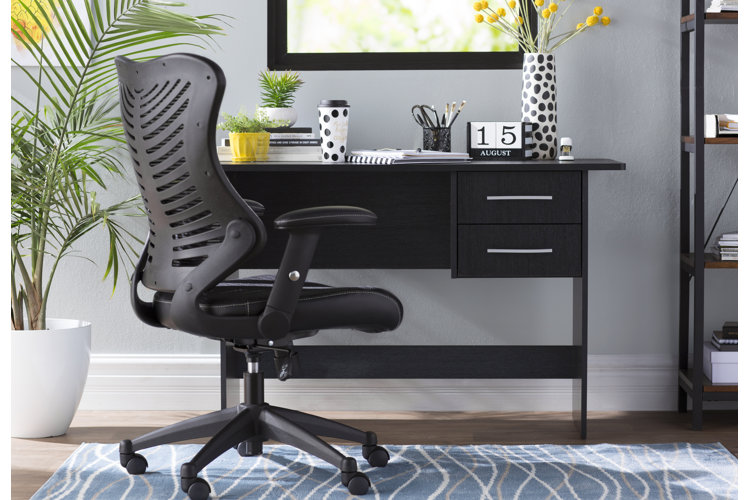
A majority of us sit at a desk for all or part of their workday, which can contribute toward bad health and even back injury. Setting up an ergonomic workspace will create a healthy, comfortable, and functional environment. Read below for our tips on ergonomic chairs.
Seat Height
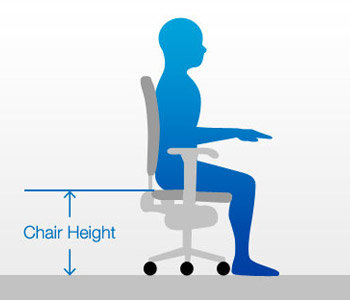
Your feet should rest comfortably on the floor or a footrest. To determine the proper height, stand in front of your chair and adjust the seat to be level with your knees. When seated, your knees should be level or slightly lower than your hips. Seat height should also allow for a 90-degree angle at the elbows for comfortable typing.
If the chair's too high, your feet and back are unsupported, which can compromise circulation to the lower leg. If the chair's too low, your lower back will flatten or round out.
Tip: Throughout the day be sure to stand up, walk around, and readjust your sitting posture to protect against discomfort and injury.
Seat Pan Length
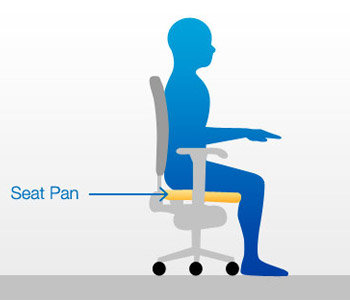
Leave a 5cm - 8cm space (or a space about the size of your fist) between the back of your leg and the front of the seat to allow for a natural bend in your knees.
If the seat pan is too short, it can hit pressure points in your thighs causing discomfort. If the seat pan is too long, your knees won't properly bend and your legs won't touch the floor.
Tip: If your seat is too long and isn't adjustable, invest in a lumbar pillow. It will provide additional back support and push your body forward, to allow for proper posture.
Seat Pan and Backrest Angles
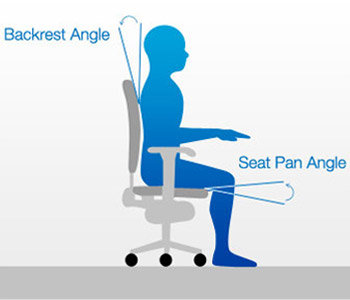
Recline your seat to an angle of 100 to 105 degrees. This will relieve pressure on back and neck muscles and spinal disks. Tilt your seat forward 5 degrees to allow proper blood flow to your lower body while seated.
Tip: Take 15-second micro-breaks to shake out your arms and do simple stretches at your desk to ward off fatigue.
Armrest Position
Armrests should match your the height of your elbows when they are relaxed at your sides. Armrests can reduce stress to muscles in the neck, shoulders, and upper back. They should be properly fitted to allow your elbows to be relaxed at your sides and shouldn't interfere with access to your workspace.
To allow for the proper ergonomic placement, many chairs have adjustable-width arm rests, which move in and out. In addition to width adjustments, the majority of arm rests also adjust up and down.
Tip: Consider removing your armrests if they don't allow you to get the proper ergonomic positioning.
Lumbar Support
The seat back plays a critical role in supporting the spine. The curvature of the seat back should support the natural curve of your spine. Your back shouldn't feel over-arched or flat. If your chair doesn't offer enough support, use a lumbar pillow or towel roll to provide the ideal amount of support.
Tip: For ideal posture, make sure to position your head directly over your shoulders and have a straight back leaning against the chair's lumbar support.
Speciality Chairs
If you need more support than the average office chair can provide, opt for one of these chairs, designed to keep you active and/or improve your posture.
Kneeling chairs work to improve posture, stimulate movement, and keep muscles and joints active.
Ergonomic chairs are designed to provide optimum support to your body, especially the lower back, while in a seated position.
Another option is not sitting at all; standing up gets you up and moving around more than seated desks, and this can ultimately eliminate the harmful effects of sitting all day. Check out our guide, The Best Standing Desks for Your Home Office.
Tip: Enjoyed this article? Then why not also check out:
- Gaming Chair vs. Office Chair: Which to Choose?
- The Most Productive Office Chairs for Your WFH Set Up
- How to Create the Ultimate Gaming Setup at Home
